Roblox 'Shop' auto-publishes to every experience July 7 — the personalized storefront that merchandises your catalog for you

Roblox is about to add a store window to every experience. On June 24, Roblox announced 'Shop: A Personalized In-Game Storefront' — an automatically generated, per-player storefront that surfaces your passes, Listed developer products, and Robux packages. It's already live for creators in Creator Hub, and it auto-publishes to all players on July 7, 2026 — with Roblox's suggested categories, whether or not you've reviewed it. The economics don't change (Roblox cites a greater-than-5% Robux-per-user lift in one early example), but how your paid catalog is merchandised, grouped, and ranked is now partly out of your hands unless you curate it. Mallow and Marsh work through what appears, what you can control, and why a brand experience shouldn't let it go live unreviewed.

Roblox 'Shop' auto-publishes to every experience July 7 — the personalized storefront that merchandises your catalog for you
Key takeaways
  • Announced June 24, 2026 ('Introducing Shop: A Personalized In-Game Storefront'). Live for creators in Creator Hub now; auto-publishes to ALL players on July 7, 2026 with Roblox's suggested categorization — Roblox builds it for you, so it goes live whether or not you touch it
  • What appears: all your passes, developer products you mark 'Listed', and Robux packages (optionally with bundled bonus items). Laid out as Top Picks (personalized per player), Categories, and a Search of your full catalog — ranked by Roblox's Product Intelligence (broad platform signals + per-game signals)
  • You keep control: rename/rearrange categories, toggle developer products Listed / Not Listed (passes are always Listed), enable the global Shop button (it's OFF by default — Roblox recommends turning it on; the hamburger-menu entry point is already automatic), hide the surface entirely via StarterGui:SetCoreGuiEnabled(Enum.CoreGuiType.ExperienceShop, false), or build a custom shop on the Product Intelligence APIs
  • Economics unchanged — Shop is a new discovery/sales surface, not a fee change; Roblox cites Steal a Brainrot seeing a >5% increase in Robux spend per user. Brand takeaway: treat Shop as merchandising, audit product names + icons, and curate it in Creator Hub > Monetization > Shop before July 7

Cast

Mallow
SENIOR CONSULTANT · 13Y

Senior consultant at ZehnStudio26. Around since the early Roblox days. Good at translating dense topics into plain language.

Marsh
Roblox game marketer · reader stand-in

A marketer in charge of a company's Roblox game. Strong on marketing, still learning Roblox-specific mechanics. Asks the naive questions on the reader's behalf.

Marsh
Mallow, I keep hearing Roblox is putting a 'Shop' into every game on July 7. Is that real — and does it touch the experiences we run for clients?
Mallow
Very real. On June 24 Roblox announced 'Shop: A Personalized In-Game Storefront'. It's an automatically generated store inside your experience. It's live for creators in Creator Hub right now, and it auto-publishes to all players on July 7, 2026. The headline is that Roblox builds it for you — you don't have to construct a shop UI at all.
Marsh
A store it builds for me. What actually shows up in it?
Mallow
Three things: all your passes, the developer products you've marked 'Listed', and Robux packages (optionally with bundled bonus items). It's laid out as Top Picks (personalized per player), Categories, and a Search across your full catalog. Players reach it automatically from the hamburger menu; there's also a global Shop button near the top bar, but that one is off by default — you decide whether to switch it on.
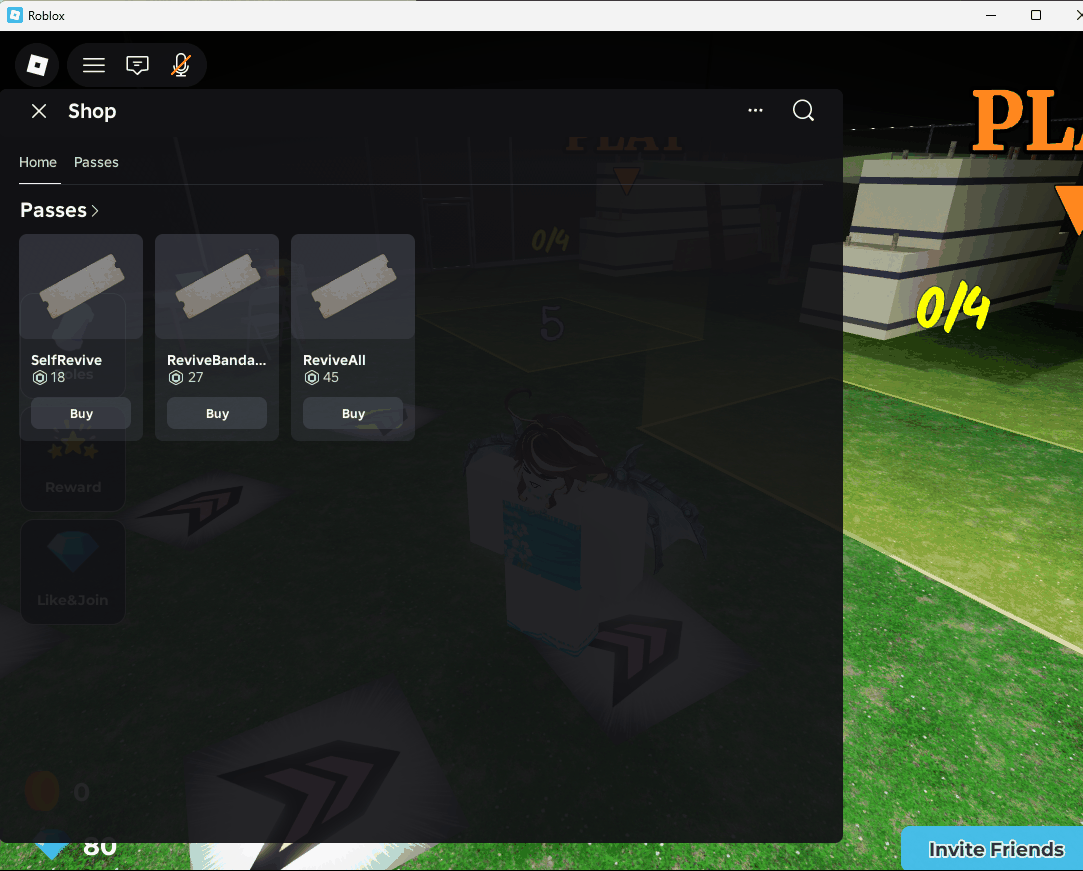
The Roblox Shop overlay open inside a live experience: Home and Passes tabs, and a Passes row showing three game passes — SelfRevive (18 Robux), ReviveBandage (27), ReviveAll (45) — each with a Buy button.
Seen in a live experience on July 8, 2026 — the day after auto-publish. Opening Shop from the hamburger menu shows the auto-generated storefront: the game's passes lined up with Robux prices and one-tap Buy buttons, merchandised by Roblox with zero work from the developer. Note the game's own reward UI still sitting behind the overlay — the two storefronts now coexist.
Marsh
'Personalized per player' — how does it decide what to put in front of someone?
Mallow
It runs on Roblox's Product Intelligence: it combines broad player signals from across the platform with signals from inside your game to rank the items each player is most likely to buy. It's the same personalization philosophy behind discovery — now pointed at your monetization catalog, item by item.
Marsh
Do I have to build any of it myself?
Mallow
No — and that's exactly the part to sit up for. Roblox generates it automatically and, per the announcement, auto-publishes it with suggested categories on July 7. You don't lift a finger. Which is precisely why you should look before then.
Marsh
If it just works on its own, why the urgency?
Mallow
Because 'auto-publishes with Roblox's suggested categorization' means a machine decides how your paid catalog is merchandised — which products are grouped together, what they're called in the storefront, what sits front-and-center. For a brand experience, that's your store window going live unreviewed. Open Creator Hub > Monetization > Shop and look at it now.
Marsh
Okay — what can I actually change in there?
Mallow
Quite a lot. You can rename and rearrange categories, move items between categories, and toggle your developer products Listed / Not Listed (your passes are always Listed). The global Shop button near the top bar is off by default — Roblox recommends enabling it for an always-visible entry point — and you can hide the whole surface with StarterGui:SetCoreGuiEnabled(Enum.CoreGuiType.ExperienceShop, false). If you want full control of the look, you can skip Roblox's UI and build a custom shop on the Product Intelligence APIs that have been available since late 2025.
Marsh
What's this 'Listed' switch you keep mentioning?
Mallow
It's a visibility control — and it applies to your developer products; passes are always Listed. Listed items appear in Shop and other eligible Roblox surfaces. Not Listed items won't appear in Shop, but they stay purchasable in-game through your own scripts. So 'Listed' is you opting a product into platform-wide discovery — evergreen products belong Listed; one-off or event SKUs you may want to keep Not Listed.
Marsh
Does Roblox take a bigger cut for a sale that happens through Shop?
Mallow
No. In Roblox's own words: it doesn't change your economics — it's a new surface to help players find and buy your items, not a fee change. And Roblox points to an early example: Steal a Brainrot saw a greater-than-5% increase in Robux spend per user. Treat that as Roblox's own figure, not an independently verified result — but the direction is 'more discovery, same take rate.'
Marsh
So for a client's brand experience, what's the play this week?
Mallow
Treat Shop as merchandising, not plumbing. Four moves. (1) Audit your product names and icons so they read as a storefront, not internal SKUs. (2) Decide curate-vs-auto — for a brand, curate the categories so they tell your story instead of letting auto-grouping speak for you. (3) Mark evergreen products Listed, and set clutter to Not Listed. (4) Do all of it before July 7, so nothing auto-publishes unreviewed.
Marsh
Sum it up for me?
Mallow
(1) Shop is an auto-generated, personalized in-game storefront — live for creators now, auto-publishing to all players July 7. (2) It shows passes + Listed developer products + Robux packages, ranked by Product Intelligence. (3) You can rename/rearrange categories, toggle developer products Listed, enable the (off-by-default) global Shop button, or hide the surface entirely. (4) Economics unchanged; Roblox cites a >5% Robux-per-user lift in one example. (5) Review Creator Hub > Monetization > Shop before July 7.
Marsh
So Roblox just handed every experience a personalized store window — and the only real question is whether we dress it to match the brand, or let the machine do it for us. I'd rather dress it.
Frequently asked questions

What is Roblox Shop, and when does it go live?
Shop is an automatically generated, personalized in-game storefront that Roblox builds for your experience. It surfaces your passes, the developer products you mark 'Listed', and Robux packages, laid out as Top Picks (personalized per player), Categories, and Search. It went live for creators in Creator Hub on June 24, 2026, and auto-publishes to all players on July 7, 2026 with Roblox's suggested categories — so it appears whether or not you've reviewed it.
Can I control or turn off the Shop in my experience?
Yes. In Creator Hub > Monetization > Shop you can rename and rearrange categories, move items between them, and toggle each developer product Listed or Not Listed (passes are always Listed). The global Shop button near the top bar is off by default — Roblox recommends enabling it for an always-visible entry point, while the hamburger-menu entry point is automatic. You can also hide the whole surface with StarterGui:SetCoreGuiEnabled(Enum.CoreGuiType.ExperienceShop, false), or build a custom shop on Roblox's Product Intelligence APIs. Listed items also appear on other eligible Roblox surfaces; Not Listed items stay purchasable in-game via your own logic.
Does selling through Shop change how much I earn?
No. Roblox states that Shop doesn't change your economics — it's a new surface to help players find and buy your items, not a change to fees or your take rate. Roblox cites an early example in which Steal a Brainrot saw a greater-than-5% increase in Robux spend per user (Roblox's own figure, not an independently verified result).

Bring your vision to a playable world.

From extending existing IP onto Roblox / metaverse to launching brand-new game titles. We design worlds, characters, and action that players step inside.

Contact us